Posts

Open Document directly in Edit Mode within SharePoint from an Email link

Image
If you send a link to a SharePoint document with Email to another user, the document is opened in read only mode. It is not possible to open it directly in Edit Mode. Therefore I wrote a little JavaScript which can do that easily. Steps to implement: 1.) Create a new page on the sitecollection you want to have this ability. Name it OpenDoc. 2.) Add the "XML-Viewer" WebPart from "Content Rollup" category. 3.) Open the WebPart Settings of the XML-Viewer WebPart 4.) Click on XML-Editor Button and add following JavaScript into it: <script type="text/javascript"> ExecuteOrDelayUntilScriptLoaded(LoadDoc, "sp.js"); function LoadDoc() { JSRequest.EnsureSetup(); var file = JSRequest.QueryString["file"]; if (typeof file != "undefined" && file != "") { var baseUrl= " http://sharepoint/sites/mysite "; var host = location.protocol + "//" + location.host; ...

Open SharePoint 2010/2013 Display, Edit, New Forms in Modal Dialogs

Image
If you want to open a SP 2010 or in SP 2013 list item in a modal dialog you have two choices. Using the standard JavaScript functions or creating own functions. How to find which item URL is called If the dialog box appears you don't have an address bar to pick up the called URL. To see which URL is called when you edit or open a list item use the Internet Explorer Developer Tools. Open your source list in the Internet Explorer. Press F12 to open the developer tools. Click on the "Network" tab and then on "Start Capturing" Now click the link you want to track. You'll see the requests listed and you can also copy the urls for your need. SharePoint usually calls the /_layout/listform.aspx with the list parameter. The form then redirects to the appropriate list form. Method 1: Using core functions When using SharePoint 2010 core javascript functions to open elements in dialogs mostly you'll need to know : the ID of the l...

TFS - ItemNotFoundException on Reporting Server while creating new Team Projects

Image
I had do deal with a problem while creating new Team Projects with Visual Studio 2010. The error message was that an an the item /Tfs2010OlapReportDS was not found. It seemed that the reports for tfs could not be uploaded due a permission problem. After hours of searching and reinstalling I found the fix for the problem. The fix was really easy. Go to your team foundation server  Open the administration console.  Click on Reporting Click on Edit Click on Reports Tab Enter the credential for the Reports Save Click on Start Jobs The whole exception message : TF30162: Task "Populate Reports" from Group "Reporting" failed Exception Type: Microsoft.TeamFoundation.Client.PcwException Exception Message: The Project Creation Wizard encountered an error while creating reports to the SQL Server Reporting Services on http://tfs/ReportServer/ReportService2005.asmx. Exception Details: The Project Creation Wizard encountered a problem while creating rep...

Using SharePoint Metadata Navigation in Enterprise Wikis

Image
I thought it would be great to use the WikiCategories field in each Enterprise Wiki Page as navigation. This works relatively easy. SharePoint 2010 offers the new metadata navigation mechanism. We'll us it to create the page. 1. Goal 2. Create Enterprise Wiki Site I had a Team Site and I wanted to create an "Enterprise Wiki" subsite. To use the Wiki site template you must first activate the "Publishing Infrastructure" Feature in your sitecollection features. The create a new subsite with the "Enterprise Wiki" template. 3. Adapt MetaData Field Click on "Site Actions" menu on the wiki page Click on pages Click on Library in the Ribbon bar Click on "Library Settings" Click on "Wiki Category" field Adapt the field with the tags you want. The meta tags must be configured in the central admin within the metadata service. 4. Activate Metadata Feature Go to your newly create Wiki site. Click on "...

SharePoint Use Confirmation for Site Owners

Image
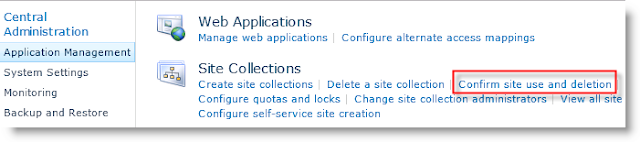
A problem in SharePoint is to keep content up to date. Therefore SharePoint offers the possibility to create use confirmations. The only problem is that the confirmation can only be approved by the site collection administrators. Not in all companies the site collection admins are also the site owners. This can be due to permission restrictions or other actions that a normal site owner should not do. In this post I'll show you how you can create your own confirmation rules and pages without using visual studio or SharePoint solution files. Standard Site Use Confirmation SharePoint offers an out of the box site confirmation mechanism. It send an email to the site collection owner and updates a counter of how many times a mail is sent without receiving a confirmation. The mechanism does not check the real use of the site. It simply send an email after a period of time to check the use. You can configure it in the Central Administration  under "Application Management...

SharePoint 2013 Developer Training Site

Found this useful site in the microsoft homepage. It contains multiple videos for SharePoint and Office 13 developers: http://msdn.microsoft.com/en-US/office/apps/fp123626

Sorted Dropdown for MatchPoint Form WebPart with Distinct Elements

Image
MatchPoint is a handy framework for creating fast custom solutions. In this post I'll show you how you can bypass some limitations with the Form WebPart. A customer of mine wanted a sorted select in his form webpart in which he can choose the assigned user of a task list. Something like that: Example of a sorted Dropdown 1.Attempt - The SPListChoiceProvider You can do this easily with a ChoiceField in the Form WebPart. As provider (Source of the Dropdown) a SPListChoiceProvider would be a logical choice. In the SPListChoiceProvider you can select the source list, a key and a value column for the dropdown. Additionally you can also select "UseDistinctValues" to remove duplicate entries. One drawback or missing feature here is the ability to choose an order for the elements. Another is that you can only choose a single field as key. There is no possibility to combine fields. 2. Attempt - The ExpressionChoiceProvider My second attempt was to use...