Posts

Remove-SPManagedAccount is not working or you can't remove Managed Accounts from GUI
Image
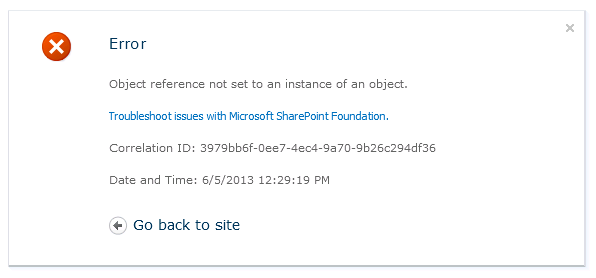
The Problem I had to change the farm administrator because the IT decided not to use a single account as local admin anymore. So I changed the farm account with powershell and adapted all the services. The only think was that I had forgot to delete the account from the managed accounts list. Weeks passed and I stumbled over the account in the managed accounts list. When I tried to open the link " Security " -> " Configure managed accounts " I got an exception. The error was obvious. The account which was deleted from the AD could not be resolved. 1.Try I created the user again in the AD. After that the error in UI disappeared but when I tried to deleted the managed account from the list, I got following error. 2. Try It seemed that there some services still reference this account. The first thing was to check the IIS Application Pool accounts. Then I checked twice the settings in the CA " Security " -> " Configure Service...

SharePoint 2010 Search Web Service returns "Attempted to perform an unauthorized operation"

Turns out that the search service has problems when anonymous authetication is on. I have a custom tool to test my search, that connects to the search service and performs queries. Every time I tried to query the service I got this error. I could not easily disable anonymous authetication on my server because we used it for some sites. This article helped me to find a solution:  The SharePoint Search Service and Anonymous Access (Trinkit Blog)

Deal easily with Safe Controls problems in SharePoint with Visual Studio 2010

Image
You get the following error when you try to add a custom WebPart in to your site: " Type is not registered as safe " Error Message This means that you: Don't have an web.config entry for your dll have a wrong web.config entry for your dll The 2nd reason is more often, especially when you develop a WebPart in Visual Studio and change the default Class or NameSpace names. Steps to solve the problem 1. Check your web.config This step is only to check if there is a web.config entry when you deploy your solution. For this deploy your solution into the farm. Open your web.config file in (C:\inetpub\wwwroot\wss\VirtualDirectories\youwebapp\web.config). Search after "<SafeControls>" and check if your dll is listed there and if so check if all parameters like PublicKeyToken, NameSpace or DLLName are correct Safe Control Entry in Web.Config Tip : If oyu deployed your assembly into the GAC, you can check the "PublicKeyT...

Different list views for folders, content types and files in SharePoint 2010

Image
There is a not well known feature of SharePoint I want to show. You can create different default list views for different content types. As an example you have a top folder for specific orders which is automatically created by your customer when he orders something. Within this folder you and your customer exchange documents. You goal is that when someone enters the order list he only sees his folder. 1. Attempt My first opinion would be to create a list view with a specific filter. But here begins the problem: How should the filter look like ? If you set " Created By = [Me] " the customer will only see documents and folders he created. When you use " Created By = [Me] & Contenttype = Folder " he would not see subfolders created by others. 2. Attempt The more elegant way is to use different content types for top folders and subfolders. Based on the content types you can create different default views. 2.1 Create Content Types So create a new con...

Debugging IIS 7.5 FTP Custom Authentication Provider

Image
A customers need was to have quickly an ftp server to share large files with some third party. The security restrictrions in our company need a two-factor autentication. So I had the idea to create a custom authentication provider where the user can provider his password and token in the ftp password field like password#token. In this post I will not explain how you create a custom authetication provider. This is explained very well on the links I'll post. I found this great blog post of Robert MyMurray where he describes how to create a custom provider with multiple examples. I followed his steps and realized that I couldn't debug the code I wrote with Visual Studio. Then I found this post on iis.net, which finally helped me to debug my code. Steps to debug: I assume that: You already created a solution and implemeted one of the examples of Rober McMurray or your own one. You signed your dll and deployed it to your Global Assembly Cache You installed and co...

Offline Metadata Instances in SharePoint 2010 & OfflineTermstoreNames

If you're using powershell to add metadata to your termstore and you see only an entry in the OfflineTermstoreNames property, then it seems that some of your Metadata Services are offline. C:\> $site = Get-SPSite http://mysharepoint/sites/project C:\> $session = new-object Microsoft.SharePoint.Taxonomy.TaxonomySession($site)  C:\> $session To activate all instances open the SharePoint Management Shell and type: C:\>$instance = Get-SPServiceInstance | ? {$_.TypeName -eq "Managed Metadata Service"} C:\>$instace It will now display all your instances. If the e.g. first and second are disabled, start it with: C:\>$instance[0] | Start-SPServiceInstance #Start First C:\>$instance[1] | Start-SPServiceInstance #Start Second Wait few minutes. Grab the instance again and check if they are enabled: C:\>$instance = Get-SPServiceInstance | ? {$_.TypeName -eq "Managed Metadata Service"} C:\>$instace Now all Termstores should be...

Migrate a SharePoint Team Wiki to an Enterprise Wiki

Perhaps someone has also migrated his old SharePoint 2007 Team Wiki to SharePoint 2010 and wants to have the cool features from an Enterprise Wiki. I searched a while and I think the best way to do this is to migrate with PowerShell. The List Wiki and the Enterprise Wiki are using different fields so there will be no other way I thing but PowerShell or manually. So the great script for your use. Just adapt the settings for your environment. <# PowerShell Script to migrate Team Wikis into Enterprise Wiki Pages #> # Setup Basic sites and pages $webappURL = "http://sharepoint-uat" $wikiSiteURL = "$webappURL/sites/serverplatforms" $wikiWebURL = "$wikiSiteURL/wiki" $pageFolder = "/Seiten/" $oldWikiWeb = "$webappURL/sites/serverplatforms" $wikiListName = "Team Wiki" try { Write-Host " >> STARTING MIGRATION ..." -foregroundcolo...
